What is a fiscal sponsor?
Fiscal sponsors are organizations with 501(c)(3) designations that provide operational support for other groups who don’t have those formal designations.
Having a fiscal sponsor allows us to accept tax-deductible contributions to build our community pool, and to seek grants like the one we have from the Boskey Memorial Foundation to support supermarket sweeps.
Who is Common Good?
Common Good is a nonprofit, working for community empowerment. They sponsor us as well as a number of other small grassroots organizations. You can read all about them at commongood.earth!
Do I need to make a Common Good account to contribute to MAMAS?
You can contribute to the community pool without making an account by going to bit.ly/donatetomamas.
If you would like to contribute via ACH or if you need to request reimbursement for MAMAS-related expenses, you do need to make an account – read on below.
Thanks for your interest in joining Common Good as a part of Mutual Aid Medford and Somerville!
You may have seen this elsewhere, but you do not need a Common Good account to contribute to MAMAS. However, if you want to help us keep more money in the community and spend less credit card processor fees, you do need to set up an account. If you will need to receive reimbursements from MAMAS, you will also need an account (more in the reimbursement section below).
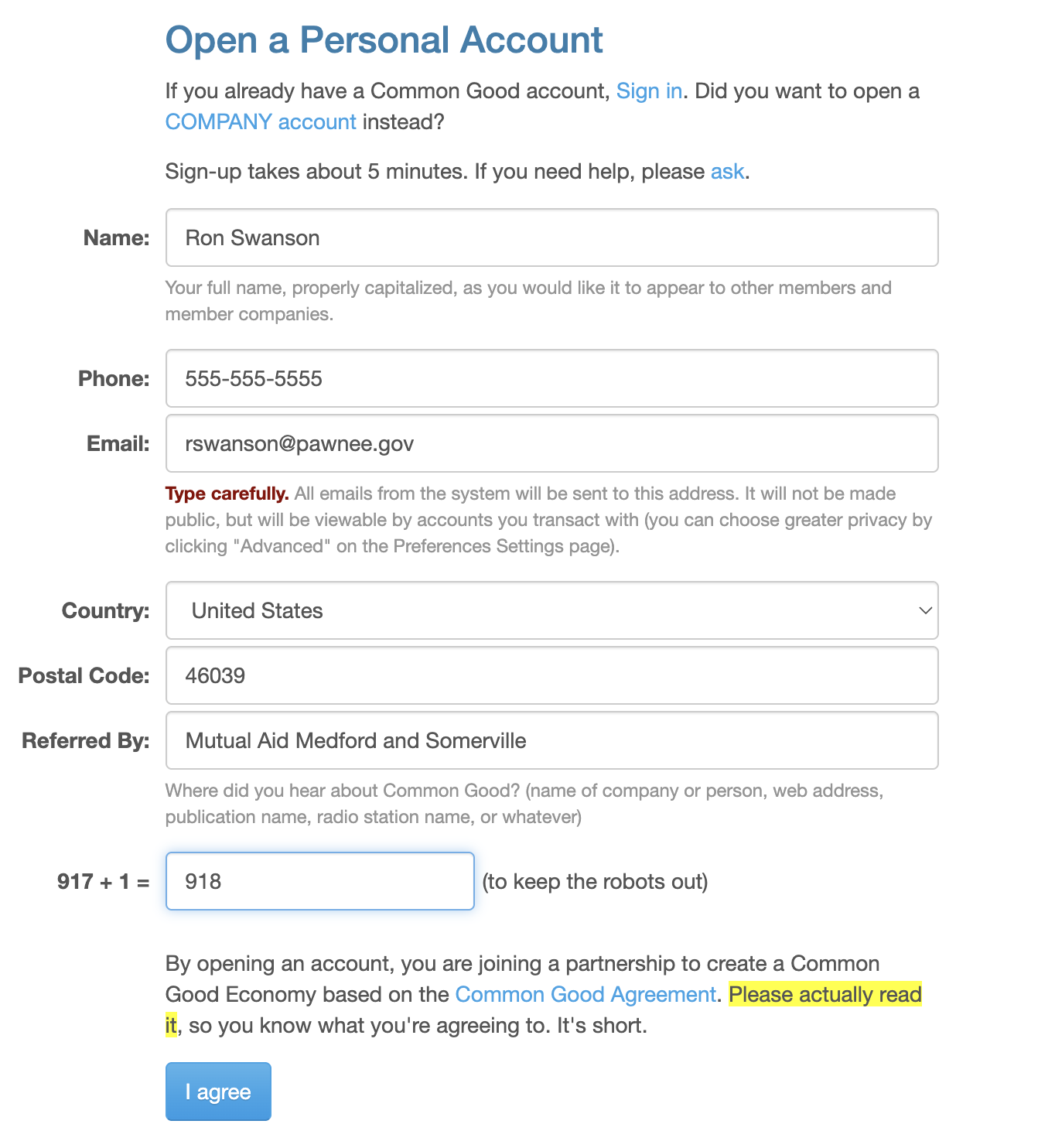
We put together this guide to help you through the steps and explain what each one is along the way. As you follow the steps ahead, refer to the pictures to see an example of how to fill in the information.
- Go to the signup page at Common Good: https://new.commongood.earth/signup
- As we go through this process, please keep in mind that this is a Common Good account and can be used for many Common Good services. However, you do not need to use these services as part of MAMAS.
- We will note in the instructions where information is for using a Common Good account versus what you’ll do with MAMAS.
- Provide some basic information on the personal account page.
- Add “Referred By” as “MAMAS” or “Mutual Aid Medford and Somerville”.
- Email privacy note: You’ll see a message that says your email be viewable with all accounts you transact with. That means if a MAMAS coordinator needed to contact you about a payment, they’d be able to look up your email. It only shares your email with others you transact with on Common Good.
- Captcha: The small bit of math to do in the form is a basic version of a captcha, which you might be more familiar with as the checkbox that says “I am not a robot.” or a set of pictures that has you identify everything that’s a car.
- Check out our sponsor: Finally, if you’re interested in the mission of Common Good, our fiscal sponsor, we recommend you check out their agreement.
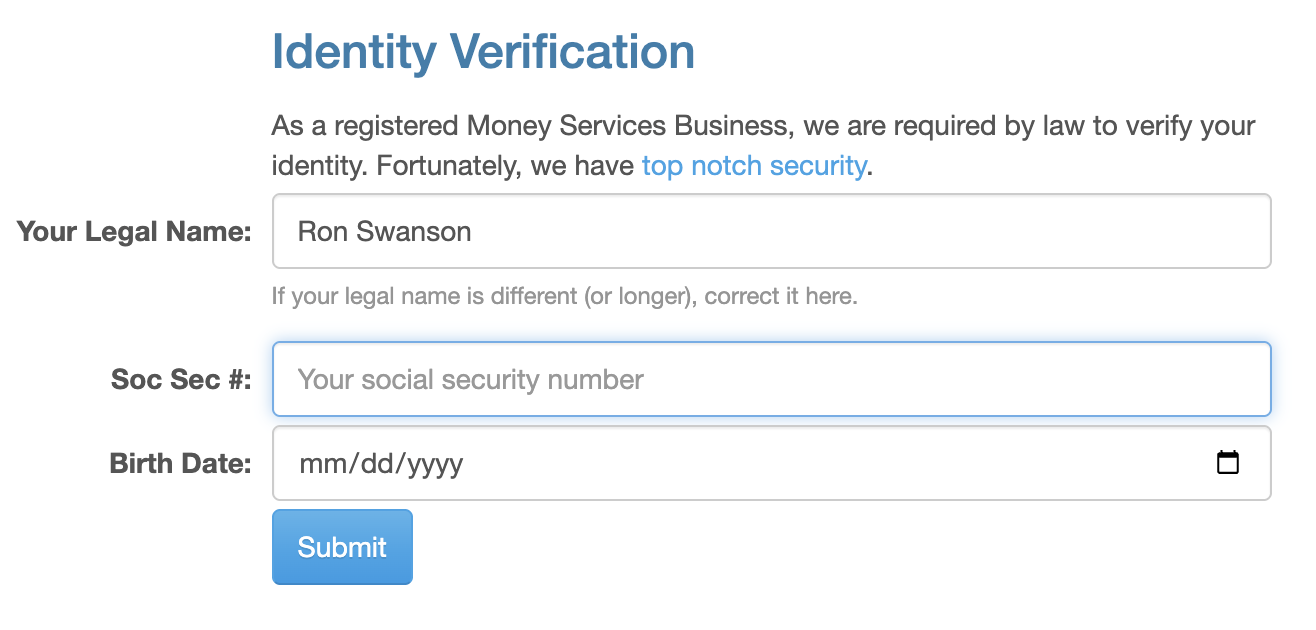
- Provide some identifying information
- ⭐ If you will need to request reimbursement from MAMAS in the future, you must enter your SSN. Massachusetts’ law requires users to give their SSN to Third-Party Payment Processors like CommonGood for tax reporting purposes. If you don’t enter an SSN, we won’t be able to process more than $600 in reimbursements.
- If you don’t need reimbursement, you can also scan a picture of your license or a photo ID instead. We have noticed that if you choose the ID option, it may take a few extra days for your account to be approved (which is totally fine!).
- Provide a photo
- This is a feature used by Common Good for their Common Good cards, which are effectively credit cards to use in the community! MAMAS does not use this service that Common Good provides, but you still will need to upload a photo of your face (not your pet, unfortunately). Your account may not be fully approved until you upload a picture. You do not have to upload one right away, but you will need to provide one to request reimbursement. You may click the “Skip for Now” button if you want to upload it later.
- Providing your contact information
- This information is required for tax purposes if you plan to request reimbursement from MAMAS through Common Good. Common Good will use this information + your SSN or ID in lieu of asking requesters for a W-9. You do not need to fill it out right away, but it must be added before requesting reimbursement. The most surprising part to us on this form is the selection for whether or not you rent or own your physical address. Once again, this is something that Common Good wants to know about for members who participate directly in its programs, but it’s not information that MAMAS will use in any way.
- Connect a bank account
- If you are receiving reimbursements from MAMAS, you will need to fill out this step!
- We recommend leaving the default options for: “No” to Round Up!, and “I will accept electronic statements” for Statements. These are typically the easiest options for MAMAS members.
- Please follow the instructions on the page to connect your account.
- We also recommend selecting the “No” option for Refills. This will not be relevant for using this account for MAMAS contributions or reimbursements.
- (OPTIONAL) Donate to our fiscal sponsor
- If you would like to donate to Common Good, you are welcome to; that money does not support MAMAS directly. Our partners at Common Good are awesome, and we encourage you to check out their mission and get involved if you’re curious. That being said, you certainly do not need to do so to participate in MAMAS.
- Otherwise, change the dollar amount to $0 and click “Skip for Now” here while setting up your account for use with MAMAS.
- Verify your email address
- We’re almost done! Here you will be asked to verify your email address, just like with many online services. Please check your email (or your spam folder) for a mail from Common Good with a link to verify your address!
- Enter a new password
- Once you’ve verified your email address, you’ll be prompted to make a password.
- At this stage, you have completed all the necessary steps to create a Common Good account. However, the website may prompt you to “finish creating your account” with any steps skipped above.
🎉🎉🎉🎉🎉🎉🎉🎉🎉🎉🎉🎉
The easiest way to contribute to MAMAS is via our donation page at bit.ly/donatetomamas. Contributions to MAMAS support our grocery programs, the free store, and the gardening collective.
If you prefer to contribute to your neighbors directly via crowdfunding platforms or payment apps, you can find opportunities to do that by joining our Slack, where we post crowdfunding requests weekly.
If you choose to contribute via a donor advised fund, or if you think we might be a good fit for your grantmaking program, please reach out to us at askyourmamas@gmail.com.
Please sign the MAMAS Tax Info Attestation Form if you plan to submit reimbursements. Requesters must sign this before their expenses can be approved.
- If you are submitting an expense to CG for the first time, create a Common Good Account. See instructions in the section above.
- If you are submitting an expense to CG for the first time, ALSO read the Tax Information in the section below, and sign the MAMAS Tax Information Attestation Form. See section below.
- Fill out the MAMAS Reimbursement Receipt Upload form.
- Explanation: Common Good does not require receipt upload for reimbursement. If you want MAMAS to hold onto your receipts in case they’re required during tax season, please fill out the form for each expense. If you plan to keep your own records, you do not have to do this! Please refer to the Common Good Tax Info section to understand why you may want to keep your receipts.
- Charge the MAMAS account on Common Good. Please see screenshots below to see what this looks like.
- Go to the Common Good website and sign in
- Navigate to your Dashboard
- Select Charge
- In the Who field, enter askyourmamas@gmail.com
- In the Amount field, enter the amount you’re requesting for reimbursement
- In the For field, enter one of the following, depending on which applies:
- Grocery working group: [Month] Grocery Pair. If you’re covering for another member of the delivery team, include the name of the person you’re covering for.
If you’re submitting for a Grocery Sweep, enter [Month] Sweeps.
This field never needs to contain the name of a pair, unless you have multiple pairs and need to distinguish them, in which case, initials are great. The less sensitive personal information, the better. - Free store: [location] Free Store storage rent [month].
If the expense is for something other than storage, submit the month of the relevant event, a short purchase summary, and the purchase date. - Other working group: submit (1) the working group name, (2) a summary of the purpose + (3) date of the expense.
- Grocery working group: [Month] Grocery Pair. If you’re covering for another member of the delivery team, include the name of the person you’re covering for.
- Select Submit
- Wait for an email from Common Good letting you know that MAMAS has confirmed your expense.
- The subject line will say: Payment Received (Transaction #XXXXX). We will try to approve expenses as often as we can, but please allow one week for us to approve it.
- Transfer your payment to your bank account. Your payment will not be deposited into your bank account if you don’t do this!
- From Common Good: It may take up to 4 business days to transfer funds (3 if you submit your request before 2pm Eastern US Time). If you have an emergency and need funds immediately, talk to us by reaching out to #wg-money in Slack or emailing askyourmamas@gmail.com.
- Please see screenshots below to see what this looks like.
- Go to the Common Good website and sign in
- Navigate to your Dashboard
- Select Bank
- Check your Balance to see how much you can cash out. You can have multiple payments still in the system, like with Venmo.
- In the Amount field, type the amount of money that you would like to transfer to your bank account.
- Select CG → Bank
- This is only relevant for individuals who plan to request more than $600 in reimbursement from MAMAS per calendar year.
- Individuals who request more than $600 in reimbursements from MAMAS per calendar year will be able to access a 1099-K tax form on the Common Good website during tax season. You should consult your own tax professional if you have questions, but based on our conversations with Common Good, you should not be required to pay any taxes on your reimbursements from MAMAS.
- More info on 1099-K forms on the IRS website.
- In the event that you or Common Good are audited, all you have to do is confirm that the items on the form are reimbursements. If they ask for proof, receipts from your transactions will be enough.
- For peace of mind, we recommend two options:
- Keep your own records. Take a picture of your receipts and add them to a file or photo album on your phone or computer, etc. Many receipts fade quickly – don’t rely on the physical piece of paper!
- We want to make this as easy as possible for everyone, so we have created an encrypted form for folks to upload receipts. We will store these securely and they will be available to you any time in case you need them. Please email us at askyourmamas@gmail.com and let us know which receipts you need.
We understand if this is frustrating or time consuming. Working with Common Good as our fiscal sponsor is currently the best option that reflects MAMAS values and community needs.
MAMAS always wants to be as transparent as possible. If there are any questions not addressed here, please email us any time with questions at askyourmamas@gmail.com.